
“Re-verify our range to target… one ping only.”
— Captain Marko Ramius, The Hunt for Red October
Every wireless engineer has a drawer full of gadgets that tell you how strong the Wi-Fi is. Most of them live in a laptop bag, and most of them want you to stop, pull out a a survey device, a laptop, a tablet, a phone, or any combination thereof, and squint at a graph. I wanted something I could wear: glance at my wrist (or lanyard, or hat brim) and know what the RF is doing around me, without breaking stride on a walkthrough. In essence, a survey tool almost small enough to swallow.
those of you who know me well will attest to my fascination with devices that emit electromagnetism at much shorter wavelengths, predominantly in the visible spectrum. I like the pretty colored blinky lights!

As part of a work meeting a few months back where the network engineering team was presenting its capabilities to the sales team, my manager asked me to provide a photo of myself, preferably some kind of action shot. I had just the thing, but it was a video clip. Rather than attempt to extract a still out of it, my manager laughed and said it was perfect and would go into the slide deck as-is:
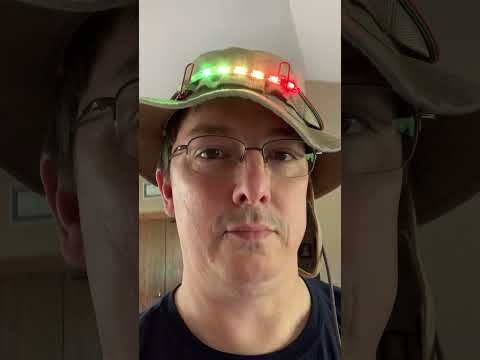
I know you’re already wondering just what kind of tomfoolery this is…
Yes, dear reader, that is a Raspberry Pi Zero W, with a short strip of addressable pixel tape. It is running a full blown RPi Linux OS to scan the wifi and translate the peak RSSI into a visual indicator. The concept was to be able to generate a survey heat map outside at night using light painting techniques, but that part didn’t work especially well. But it made for a cool hat!
After the meeting, several colleagues wondered if I still had it. Alas, while the pieces are somewhere, repurposed, the code is long lost. They then asked if I would consider making a re-engineered version for our annual sales kickoff where we all get together in one place. one of the key weaknesses of the original is that it only supported 2.4GHz 802.11n. Any new version would need to support 802.11ax and 5GHz. the other was that in the grand scheme of things, the Raspberry Pi W is actually kinda big. and a RPi with 5GHz support would require external USB peripherals. Having played around with some lighting controllers in the ESP32 space, and knowing that space is rife with cheap devices that only support .11n/2.4 GHz, I started searching for ESP32 devices that might support 5GHz. Sure enough, I found the ESP32-C5, which not only supports dual-band 802.11ax, it also has TWO UARTs on board, which will come in very handy for a lighting project (which will be the subject of a future post). Downside is that stock is a tad limited. However, Seeed studio had the 2.4-only -C6 model available in a 3-pack for around $11, with an external u.FL antenna connector. And then I saw that Waveshare had one with a tiny 1.8” display piggybacked on to it. A few clicks later, Amazon was delivering my new gadgets (including a set of u.FL to RP-SMA antenna pigtails – antennas, I have oodles of).
Then i had to figure out how I was going to program these little postage-stamp-sized computers. With the help of VSCode and Copilot, I was able to get the ESP-IDF framework installed, and create a new project. And then I turned to Claude, and told it what I wanted to accomplish. It asked a few clarifying questions, and in a few minutes, had flashed the C6 with a basic application that scanned the WiFi environment and returned it on the console. The ease with which Claude had done all the research built the code framework, and loaded it onto the ESP, all from a short 2-paragraph description of my desired result, was mind-boggling. And so I switched over to the fancy one that had the tiny display, and asked Claude to flash the same code onto it, whereupon I discovered it already had a built-in RGB LED.
And then I got crazy, trying to see what all kinds of tricks I could persuade Claude to make this thing do. What started as “make an LED change color with signal strength” turned into a pocket-sized Wi-Fi, Bluetooth, Zigbee and GPS tool. The more I added to it, the more I wondered just what esoteric Wi-Fi functions this chipset supported. And then I realized that it supports 802.11mc Fine Timing Measurement. Sadly, I lacked an AP in the lab that had FTM responder capability with which to test. However, since I have low-level access to the 802.11 hardware, I had Claude build in FTM capability to at least tell me what a given SSID or AP supported.
And then it hit me… I asked Claude if it was possible to turn one of the headless C6 units into a Wi-Fi access point whose only job in the world was to act as a FTM responder for measurement. Next thing I knew, Claude was asking me to connect one so it could flash the AP firmware. I had just created a set of location beacons way more accurate than the Bluetooth beacons I’d used with Aruba Meridian back in 2021. Naturally, those beacons had to be named for a classic movie line: One Ping Only.
Because I had low-level access to the wifi chipset, I could put anything I wanted into those beacons, so I then added the ability to send Location Coordinate Information (LCI) in the standard vendor-specific IEs that Aruba APs support, as well as making the beacon’s location known in a few other ways - either configured statically or with live NMEA position data from a GNSS module (as you may recall, I have a patent relating to such things!)
But enough backstory, this is starting to read like a recipe post. So on to the main course: what does this thing actually do?
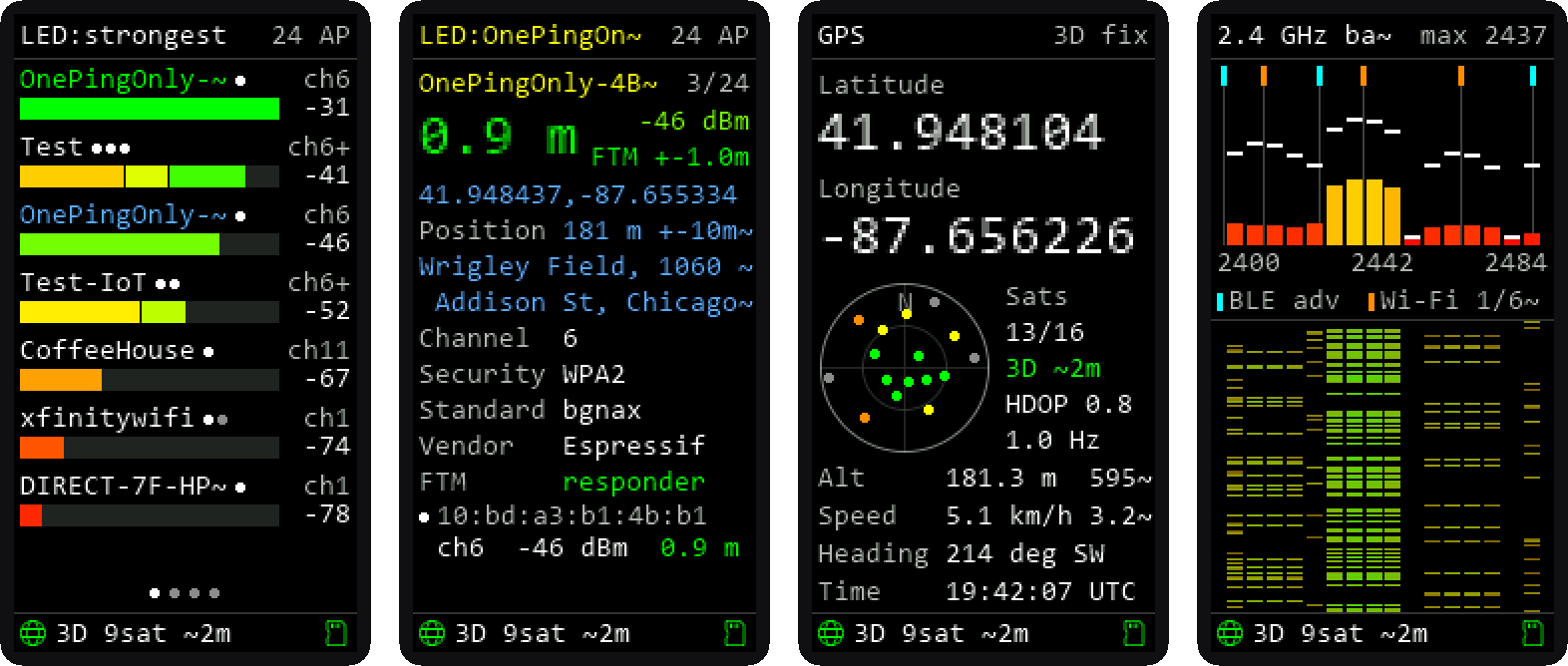 Wi-Fi list, network details (FTM distance and broadcast location), GPS, and 2.4 GHz band usage. Simulated screenshots, rendered from the firmware’s drawing code.
The hardware
The whole thing runs on the ESP32-C6, Espressif’s little RISC-V chip that does 2.4 GHz Wi-Fi 6, Bluetooth LE 5 and 802.15.4 (Zigbee/Thread) in one package. Two boards:
- The wearable: a Waveshare ESP32-C6-LCD-1.47, which packs a 172×320 color LCD, an RGB LED and a microSD slot onto a board about the size of a stick of gum. Add an optional serial GPS module and a battery.
- The beacons: a couple of Seeed XIAO ESP32-C6 boards, one with the built-in antenna and one with an external antenna on the u.FL jack. They’re headless and run as access points named
OnePingOnly-XXXX. More on those in a bit.
What it does
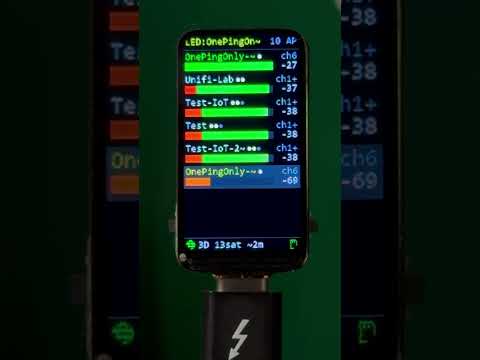
It boots (almost instantly) to the WiFi scan SSID list. A long press on the built-in button opens the mode menu. A short press pages through lists, and a double press opens the details for whatever is at the top of the page.
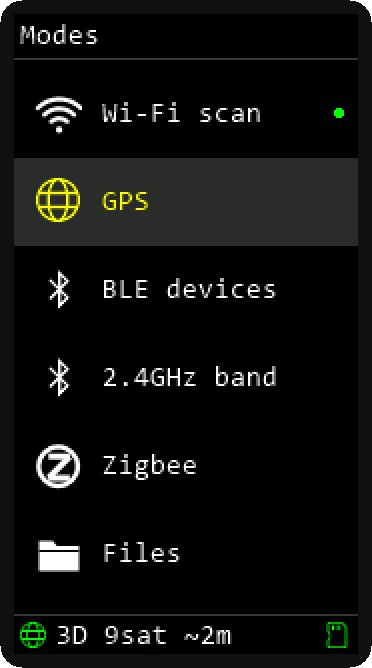
- Wi-Fi scan: every network in range, with overlaid signal bars for each BSSID, a dot per access point, and the channel. The RGB LED shows the strongest signal (or whichever network you lock it to) on a red-to-green scale, so you can read it without looking at the screen at all. Or use it for light painting.
- GPS: position, speed, heading, and a satellite sky plot, from a GPS module, a computer over USB, or your phone over Bluetooth.
- BLE devices: everything advertising nearby, with names, makers and rough distance. Lock onto one and the LED becomes a hot/cold finder.
- 2.4 GHz band: RF energy across the whole band (in 5MHz strips), with a waterfall, so you can see Wi-Fi channels 1, 6 and 11 and the BLE advertising channels light up.
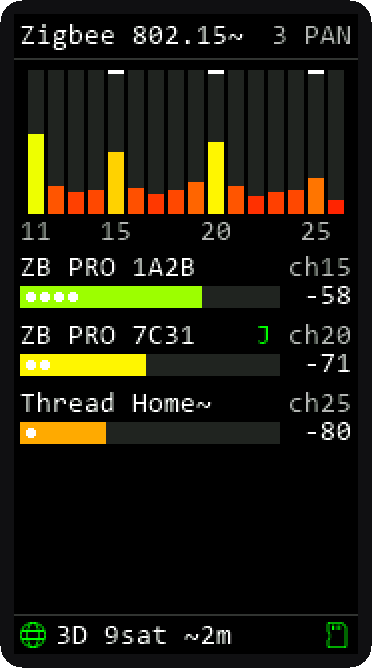
- Zigbee: energy on 802.15.4 channels 11–26 and any Zigbee or Thread networks that answer a beacon request.
- Files: the microSD scan logs (CSV, one row per AP per scan, with GPS position). Double press and it starts its own access point with a download page, so you can grab the logs from a phone.
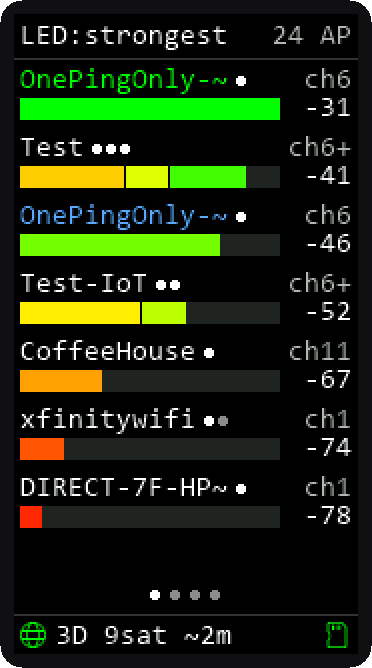
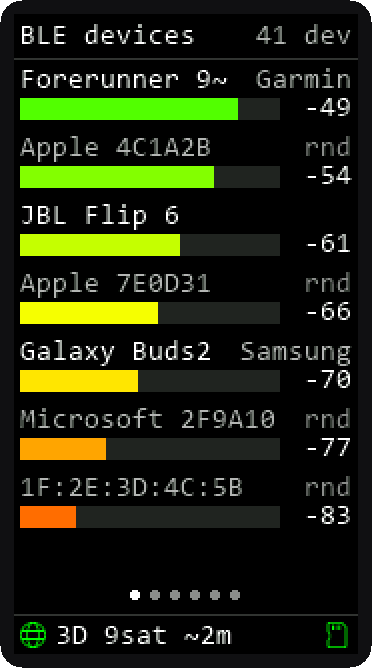
The list keeps its order once it’s built: new networks get added at the bottom instead of everything jumping around every scan, which matters a lot more than you’d think when you’re walking. Networks that drop out stay listed (grayed out) for five minutes. SSIDs that have multiple BSSIDs will stack the RSSI bars, and each one seen is represented by a dot, which will turn gray if it’s out of range.
How far away is that AP, really?
RSSI-based distance is, charitably, a vibe. I have a post about how it works for Bluetooth, if you want to know more. Walls, bodies, antenna orientation and the phase of the moon all move it by 10 dB, so the scanner treats an RSSI estimate as “near / a room away / far” and shows it in white.
But the ESP32-C6 supports 802.11mc Fine Timing Measurement (FTM): the client and AP exchange timestamped frames and measure the round-trip time of flight. Light covers about 30 cm per nanosecond, so with decent timestamps you get real distance, not a guess. When a network’s beacon says it’s an FTM responder, the details screen ranges to it between scans and shows the result in green (uncertainty under 3 m) or yellow.
Which brings us to the beacons. Not many APs in the wild advertise FTM responder support, so I built my own: the XIAO boards run as OnePingOnly-XXXX access points that answer FTM requests. (Ranging doesn’t need a connection; the password just keeps people from joining.) Their status LED flickers every time someone pings them.
Calibration, or: the cable is part of the distance
FTM measures the whole signal path, including the antenna cable and the radio’s internal delays. Out of the box my two responders read about 2.9 m and 2.5 m at a measured 1 m. The external-antenna board reads shorter despite having more cable, because the two antennas and RF paths simply have different delays. On top of that, the scanner itself has a ranging offset that changes by up to ±0.9 m every time it reboots, the same for every responder.
ESP-IDF has a call to set a responder-side offset, but it made no consistent difference in testing. So each responder now broadcasts its own calibration correction in its beacon (195 cm for the built-in antenna, 145 cm for the external one), and the scanner subtracts it. At 30 cm apart they now read 0.6–0.9 m, which is within that per-boot wobble.
Where is that AP?
Distance is nice; location is better. The responders also broadcast where they are. For testing, one of them is convinced it lives at Wrigley Field, because if you’re going to fake a location you might as well pick a good one.
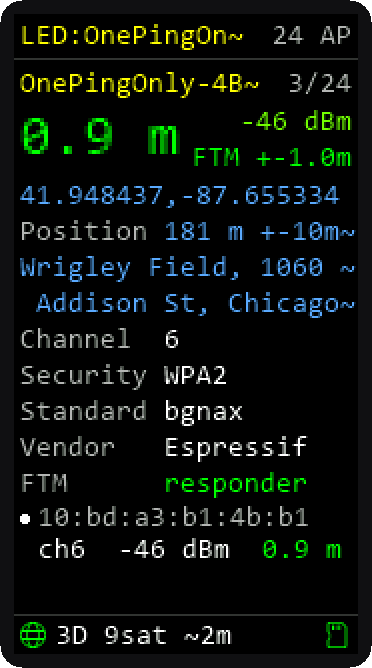
The location goes out three ways:
- In the beacon, HPE Aruba style. Aruba APs can advertise their location in a vendor-specific element (OUI
00:0B:86, subtype 8), carrying an 802.11 LCI report: latitude, longitude, altitude and uncertainty in the RFC 6225 binary format. Tools that already understand Aruba’s element can read the OnePingOnly beacons with no changes.
- In the beacon, in a second element under Espressif’s OUI, carrying the civic address in RFC 4776 format (the form RFC 5580 uses: country, state, city, street, house number, postal code, venue name), the FTM calibration correction, and whether the position is fixed or from a live GPS fix.
- Over ANQP (802.11u). The responders answer GAS queries for AP Geospatial Location (Info ID 265) and AP Civic Location (266), the standards-based way to ask an AP where it is without associating.
On the scanner, any network broadcasting a location shows its name in blue, and the details screen shows the coordinates and street address, marked “ANQP” when they came from a query.
I had claude write up the byte-level format of both elements and the ANQP responses, with decoded captures, so other tools can parse them.
WiFi Explorer can parse the coordinates in the Aruba IE, as I requested that capability when Aruba launched the 600 series APs when I was still at HPE. Testing the custom IEs with WFE caught two bugs:
(1) the first attempt at the Aruba element carried a bare RFC 3825 field instead of an LCI report subelement, so the first byte (0x5C) was read as “subelement 92”. Thanks to Adrian for letting me know what subelements WFE knows about.
(2) altitude is 22.8 fixed point, so a decoder that doesn’t divide by 256 reports the 181 m elevation of Wrigley as 46,336 m.
A few things that made this more interesting than expected:
- ESP-IDF only gives you two vendor-element slots per frame type. One for position, one for civic and calibration, and there’s no room left for an Interworking element. So the responders answer ANQP, but they can’t advertise that they do. Clients that only query APs announcing Interworking won’t ask; the scanner asks anyway.
- The vendor-element receive callback doesn’t fire during scans, so the scanner runs a promiscuous sniffer alongside the scan to catch the location elements in beacons and probe responses.
- Bit order. The 802.11 LCI field packs RFC 6225’s fields least-significant-bit first, which is backwards from how the RFC draws them. I checked it against the test vector in hostapd before trusting it.
GPS, three ways (four, if you count the demo)
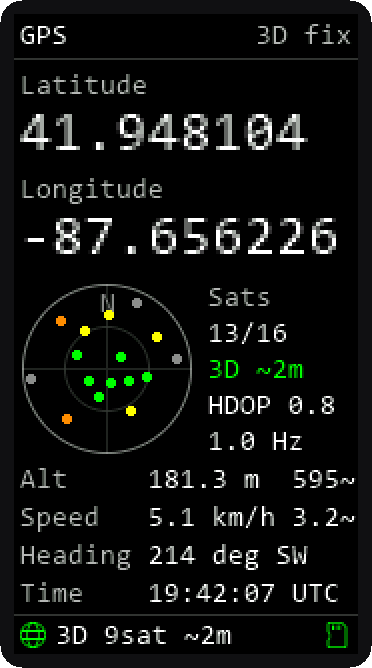
With a GPS fix, every scan row in the microSD log gets a position, which turns a walk around a building into a survey dataset. The GPS screen shows position, altitude, speed, heading and a sky plot: north at the top, the horizon at the outer ring, satellites in the fix colored by signal strength.
The position can come from:
- A GPS module on a serial port: any NMEA receiver, with the baud rate detected automatically.
- A computer over USB. NMEA lines sent to the scanner’s USB port are used just like a module’s. A small Python script forwards a GPS on the laptop, sends a fixed position, or replays a log.
- A phone over Bluetooth LE. Pair the phone (the scanner shows a six-digit passkey to type in) and the scanner both sends its own position to the phone as NMEA, the way a Bluetooth GNSS receiver does, and accepts the phone’s location when it has none of its own.
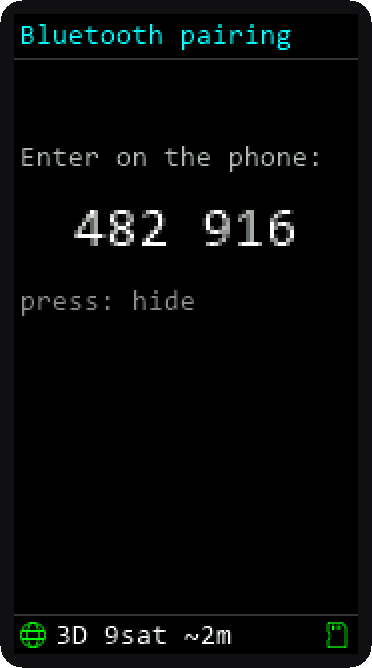
The Bluetooth link is a switch on the GPS screen, off by default, and there’s a reason. The C6 has one 2.4 GHz radio shared between Wi-Fi and Bluetooth, and while Bluetooth is advertising or connected, a full Wi-Fi scan takes about 4.9 seconds instead of 2. That’s a trade-off you should choose, not one the device makes for you.
Lessons from the bench
- The XIAO ESP32-C6 has an RF switch you have to drive. GPIO3 powers it and GPIO14 picks the antenna. Leave them alone and the radio works, just about 20 dB weaker than it should. That one took a while.
- Use 20 MHz channels on 2.4 GHz. The responders were initially coming up at 40 MHz, which is bad manners on a band with three non-overlapping channels.
- Don’t trust the first calibration. What I initially took as “the external antenna adds a meter” turned out to be the scanner’s per-boot offset. Measure across several reboots before you believe anything.
- Build a demo mode. For recording video, the firmware can tour all the modes on a timer, with a simulated GPS receiver walking laps around Wrigley Field, and it can redact a word in SSIDs and Bluetooth names (like, say, your last name in your home network’s SSID) on the screen, in the serial log and in the SD log.
Where does it go from here?
Since the beacons have underutilized Bluetooth and a known location (either static or GPS), I would like to implement a receiver and reporter for Apple’s Find My devices such as AirTags. Maybe some integration with HomeAssistant.
Also, I want to make this work on a 5GHz-capable ESP32 module.
The code
Everything is on GitHub: canerdianeh/esp32c6-wifi-scanner. The scanner and the responders are both ESP-IDF v6.1 projects, and the READMEs cover building, flashing, wiring and every menuconfig option.
AI disclosure: this project was built using Claude Code. Claude also built the bulk of the technical portion of this writeup and the simulated screen shots. The narrative portion is mine, with some structural help from Claude (and Claude even threw in a bit of snark that captured my usual writing style with surprising accuracy). Model used was Sonnet 5.5/Medium.